
Archive Converter
Convert online and free Archive Converter
 Google Drive
Converting in only three steps
With file-converter-online.com, you can easily convert various file archives (e.g. .RAR, .ZIP, .7Z, .tgz and many more) into other archives. This saves you from having to install additional software, as most archives can be opened directly after conversion to the familiar .ZIP format.
The following archive formats are currently supported:
.rar, .zip, .tar.gz, .tgz, .gz, .tbz, .bz, .bz2, .tzo, .tlz, .txz, .t7z, .jar, .war, .lha, .7z, .alzip, .ace, .arj, .arc, .cab, .lzma, .lzo, .lz, .xz, .rzip, .lrzip, .7zip, .cpio
Archive formats at a glance: from 7z to rar and tar to ZIP
Archive formats bundle multiple files and folders into a single file. This is not only practical for sending by email, downloading from the internet or archiving, but most formats also compress the content. This saves space on your hard drive, SSD or in your mailbox. But which format is suitable for what? How widespread are they currently and which formats have been replaced? This article aims to provide an overview of the most important archive formats, their history, strengths and weaknesses.
Tabular comparison of the most important archive formats:
| ZIP | RAR | 7z | tar | tar.gz | tar.xz | tar.zst | |
|---|---|---|---|---|---|---|---|
| Developer | PKWARE | win.rar GmbH | Igor Pavlov | AT&T Bell Labs | GNU Project | Lasse Collin | Meta (Facebook) |
| Introduced | 1989 | 1993 | 1999 | 1979 | 1992 | 2009 | 2015 |
| Algorithm | DEFLATE | Proprietary | LZMA2 | None | gzip (DEFLATE) | LZMA2 | Zstandard |
| Compression ratio | Good | Very good | Very good | None | Good | Excellent | Very good |
| Speed | Fast | Average | Slow | Very fast | Fast | Slow | Very fast |
| Encryption | Yes (AES) | Yes (AES) | Yes (AES) | No | No | No | No |
| Native OS support | Windows, macOS, Linux | No | No | Linux, macOS | Linux, macOS | Linux, macOS | Linux |
| Open source | Yes | No | Yes | Yes | Yes | Yes | Yes |
| Solid compression | No | Yes (optional) | Yes | – | Yes | Yes | Yes |
| Multivolume / Split | Yes (rarely used) | Yes | Yes | No | No | No | No |
| Typical use | File sharing, email | Downloads, gaming mods | Backups, large archives | File bundling (Unix) | Linux source code, backups | Linux packages, distribution | Linux packages (new), backups |
Benchmarks: Compression and speed in practical testing in 2026
For the benchmark, we packed five typical file types using different compression methods: a test file exactly 1 MB in size (excerpt from "War and Peace"), an approximately 8 MB folder containing mixed files (text, JPG, PDF), the current 7zip source code, a web server log file almost 100 MB in size, and a 347 MB Alpine Linux ISO. Compression was performed using the latest versions of ZIP, 7z, tar.gz, .tar.xz RAR and Zstd with default settings on a Ryzen 3950X.
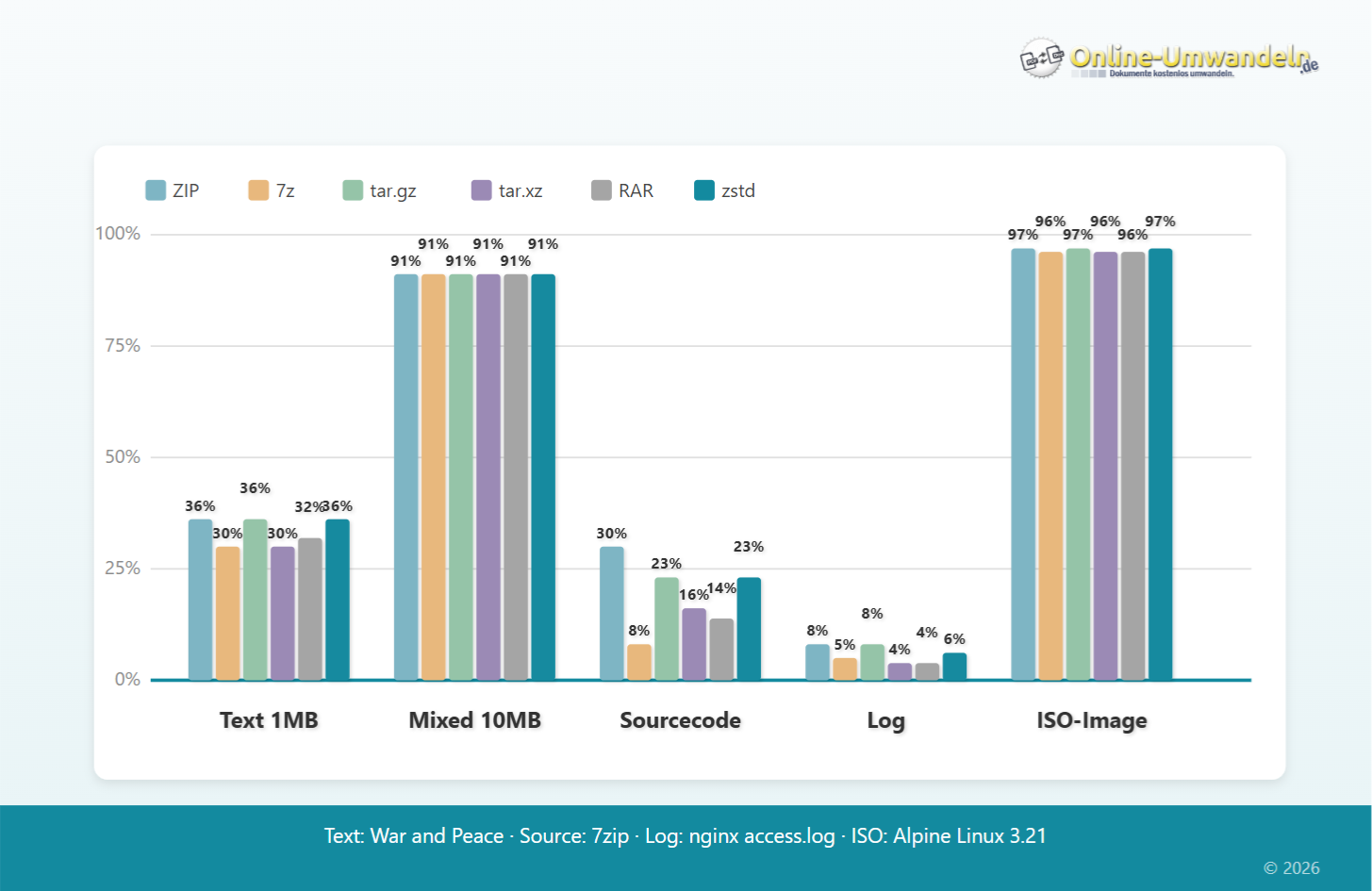
The first diagram shows the compressed size as a percentage of the original. The smaller the bar, the better the compression. As expected, the differences are greatest for text files and log files: 7z and tar.xz achieve only 4-8% of the original size here. Zip and .tar.gz achieve 8 to 36%. For already compressed files such as the ISO image or the mixed folder, all formats achieve over 90%; additional compression hardly makes any difference here.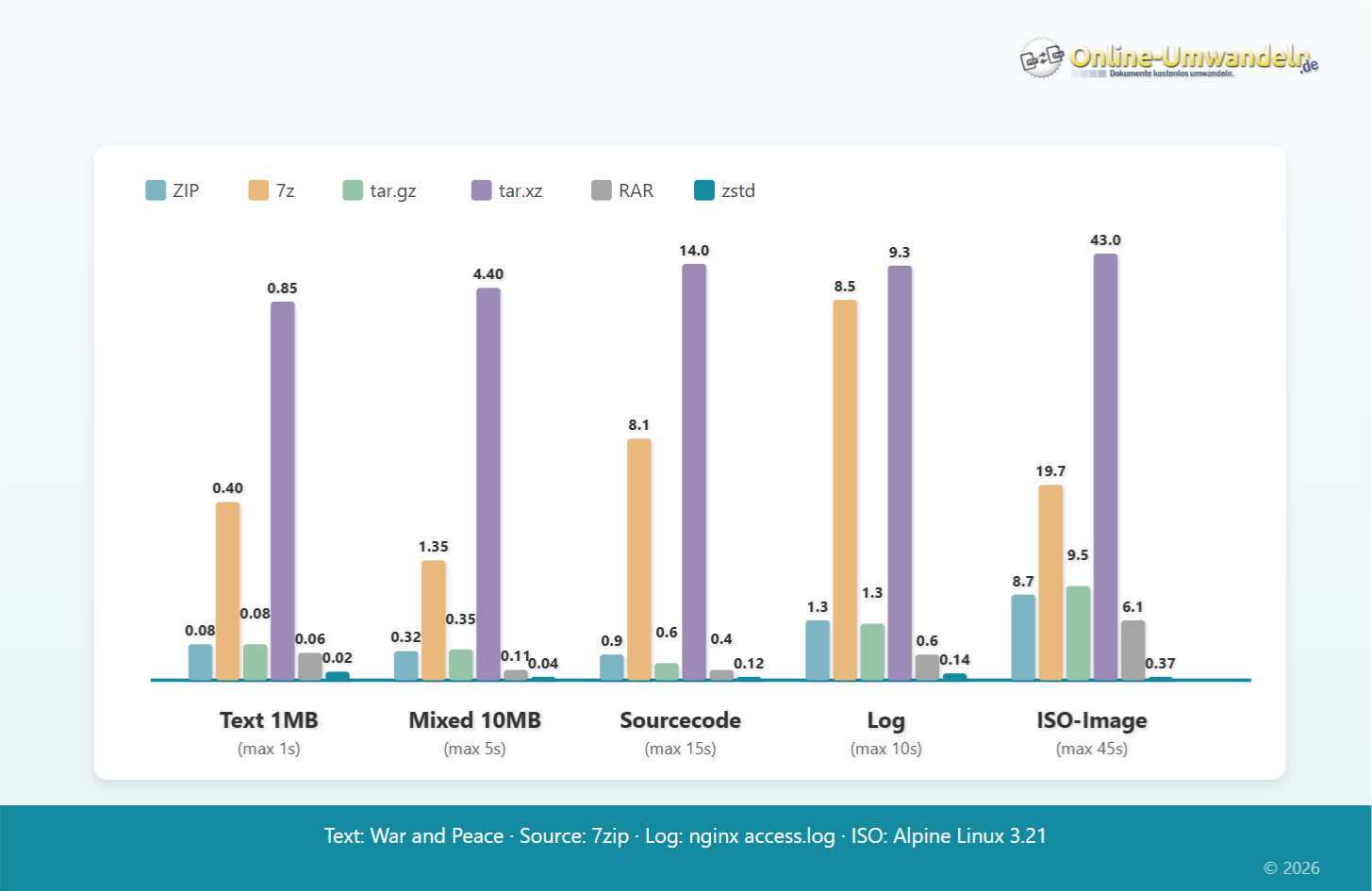
The second diagram shows the time required to create the archive. ZIP, tar.gz and rar compress quickly, while 7z and especially xz take significantly longer. Better compression therefore comes at the price of additional waiting time. The scales vary for each test file, so they can only be compared within the respective category.
It is clear to see that the relatively new ZSTD standard is a real high-flyer in terms of performance. In all scenarios, zstd is considerably faster, while the file size is practically the same as with gzip.
ZIP – the universal all-rounder
ZIP is by far the most widely used archive format in the world. Windows (since version ME/2000), macOS and Linux can open and create ZIP files without additional software. This universal support makes ZIP the most compatible option for file exchange: every recipient should be able to open the file.
The history of ZIP files:
The emergence of the ZIP format is closely linked to a legal dispute: in the 1980s, the ARC format from System Enhancement Associates (SEA) was THE standard for data compression. Young programmer Phil Katz from Milwaukee developed PKARC, a faster and more stable alternative. However, Katz was sued by SEA for copyright infringement and lost the legal battle.
Phil Katz responded by developing a completely new archive format: ZIP. In early 1989, Katz released the format together with the "PKZIP" software. Unlike ARC, however, he released the complete format specification as public domain. This meant that anyone could develop and release ZIP-compatible software.
This openness was and remains crucial to the format's success: While SEA and the ARC format later sank into obscurity, ZIP became the standard within a few years. However, Phil Katz only experienced the triumph of ZIP to a limited extent: he died in 2000 at the age of only 37. His company PKWARE still exists today and continues to maintain the ZIP specification.
Technical features of the ZIP format:
ZIP uses the DEFLATE algorithm for compression by default. DEFLATE offers a good compromise between speed and file size. Newer ZIP versions also support stronger algorithms such as LZMA or Zstandard, but with the disadvantage that older archive programmes cannot unpack these files.
ZIP compresses each file individually. This has the advantage that each file can be read individually without having to unpack the entire archive. The disadvantage, however, is that redundancies in similar files are retained during compression. As a result, the archives may be larger. ZIP therefore does not support progressive compression (also known as solid compression).
RAR – the classic format for Windows
RAR (Roshal Archive) is probably the second best-known archive format after ZIP, at least in the Windows world. It offers better compression than ZIP, but as a proprietary format, it cannot be opened without additional software.
The history of RAR
RAR was developed in 1993 by Russian programmer Eugene Roshal. Roshal was just 21 years old at the time, even younger than Phil Katz when he developed PKZIP. Roshal first developed a DOS version and then released WinRAR for Windows in 1995.
Unlike ZIP, RAR is proprietary. This means that the format specification is not public. While there are numerous programmes that can unpack RAR files (7-ZIP, PeaZip, etc.), only licensed programmes are allowed to create RAR archives.
Why did RAR become so popular?
RAR became widespread in the 1990s and 2000s, especially in the download scene. The format offered two important features: better compression than ZIP (important because storage space was scarce and internet connections were slow) and the ability to split large archives into multiple parts (multivolume archives). The latter was useful for distributing large files across multiple floppy disks or CDs or for circumventing upload limits.
RAR today
With faster internet connections and better native ZIP support, RAR has lost its importance. ZIP is now the better choice for general file exchange. Nevertheless, the RAR format still has its fans today and is still popular in the gaming sector, for example for mods.
7z – open source with maximum compression
7z is the standard format of the open-source programme 7-Zip and offers some of the best compression among the common archive formats. However, better compression also means longer compression times.
The history of 7z
7-Zip was also designed by a Russian developer: Igor Pavlov released 7-Zip in 1999. The programme and file format are licensed under LGPL and are therefore completely open source. Pavlov also developed the LZMA algorithm, which forms the basis for 7z. Although the specifications are open and the compression is very good, 7z has not yet become widely accepted, as native operating system support is lacking for widespread use.
When 7z is useful
7z is ideal for backups and archives where file size is more important than compatibility for exchange. For long-term storage of large amounts of data, better compression makes more sense in the long run, even if the initial compression takes a little longer.
tar – the dinosaur of archives
tar (Tape Archive, also known as tarball) is the traditional archive format in the Linux and Unix world. What makes it special is that tar itself does not compress the files. It simply bundles several files and directories into a single file. ZIP also has this function, but it is the exception there, whereas with tar it is the standard.
The history of tar
Tar was developed in 1979 for Unix 7 at AT&T Bell Labs. The name "Tape Archive" also reveals its original use: backing up files on magnetic tapes. The format is thus one of the oldest archive formats still in active use.
The Unix philosophy: "A program should do one thing and do it well" is reflected in tar: it bundles files without compressing them. A separate programme is used for compression: gzip, bzip2, xz and, more recently, zstd. The combined formats are then named accordingly: .tar.gz (or .tgz), .tar.bz2, .tar.xz or .tar.zst.
.tar.gz, .tar.xz, .tar.zst – the differences
.tar.gz uses gzip for compression. gzip is the classic standard for source code packages and has been widely used since the 1990s. Compression is fast, but depending on the settings, not particularly strong.
.tar.xz uses the LZMA2 algorithm (as in 7z) and achieves the best compression rate among the tar variants. However, compression is significantly slower. Many Linux distributions use .tar.xz for their package archives, as the bandwidth savings justify the longer compression time.
.tar.zst uses Zstandard and offers an excellent compromise: the compression is almost as good as xz, but is significantly faster. More and more Linux distributions are therefore switching from xz to zstd. Arch Linux has been using Zstandard for its packages since 2020, Fedora since 2019.
Zstandard: Newcomer with potential
Zstandard (zstd) is a relatively young compression algorithm. Developed in 2015/2016 by Yann Collet at Facebook (now Meta), it is spreading rapidly. What makes ZStandard special is that zstd solves a problem that other algorithms have, namely the conflict between speed and compression rate. Traditionally, if you wanted high compression, you had to wait a long time (as with xz), and if you needed it fast, you ended up with larger files (e.g. gzip). Zstandard breaks this pattern: with a compression rate comparable to xz, its speed is roughly equivalent to that of gzip. Thus, zstandard combines the advantages of both formats in one.
Distribution
The adoption of Zstandard is progressing rapidly:
Linux distributions: Arch Linux switched from xz to zstd in 2020, Fedora already in 2019
Windows 11: Since October 2023, Windows 11 can unpack .tar.zst without additional software
Browsers: Chrome (since version 123 in March 2024) and Firefox (since version 126, MID-2024) support zstd for websites.
For end users, zstd is not yet as relevant as .rar or .zip, but the standard is already established in the server and developer environment.
Which format for what?
For file exchange: ZIP. Anyone can open it, no explanations necessary.
For backups and archiving: 7z or .tar.zst for maximum compression.
For Linux source code and packages: tar.gz (classic), tar.xz (small) or tar.zst (modern).
For receiving RAR files: Unpack with 7-Zip or another compatible programme – or convert to a more convenient format right here.
Sources and further links
- RFC 8478 – Zstandard Compression (IETF standard)
- APPNOTE.TXT – Official ZIP format specification (PKWARE)
- 7z format – Official documentation (7-Zip)
- GNU tar – Official project page
- Zstandard – Official project page (Meta)
- Where Was the Zip File Invented? – Milwaukee Magazine, 2023 (A very readable article about the history of Phil Katz and PKWARE)
No Comments